

Team Collaboration & Workflow Control
Keep every team member informed, accountable, and connected.
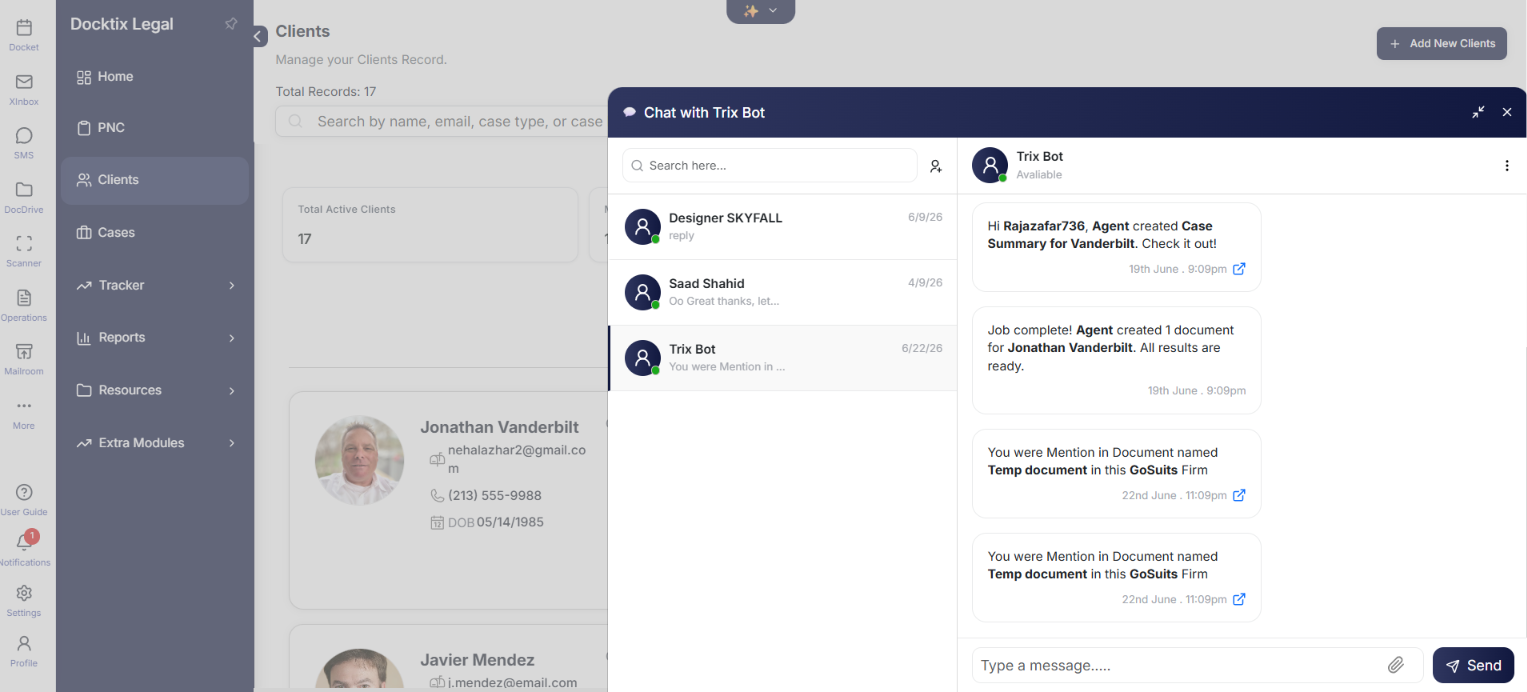
Real-time internal chat, role-based channels, case activity timelines, task assignment with deadlines, and end-to-end workflow tracking across legal operations.
KEY BENEFITS
What you unlock with Team Collaboration & Workflow Control
Real-Time Chat
Internal chat by case or department keeps communication fast and contextual.
Role-Based Channels
Tagging and assignment ensure the right people see the right updates.
Activity Timelines
Notes, updates, and strategy discussions tracked in a case activity timeline.
Task Management
Assign tasks with deadlines, reminders, and follow-ups to keep work moving.
COMMON USE CASES
How law firms use Team Collaboration & Workflow Control with Docktix
- Assign a paralegal to collect medical records with a deadline
- Discuss case strategy in a dedicated case channel
- Track every update and note on a case in one timeline
- Tag an attorney for review when a document is ready
- Monitor workflow progress across the entire firm
PRICING PLANS
Transparent Plans for Every Firm
Scalable solutions designed to grow with your practice.
Starter
- Up to 3 Users
- Basic Case Management
- Standard Intake Forms
- Email Support
Professional
- Everything in Starter
- Full AI Workforce Access
- Medical OCR & Chronologies
- QuickBooks Integration
Advanced
- Unlimited Users
- Custom AI Fine-Tuning
- White-Glove Onboarding
- Dedicated Account Manager
Ready to connect Team Collaboration & Workflow Control?
Set up the Team Collaboration & Workflow Control integration in Included and start automating your case workflows today.
More Management Integrations
'/%3e%3c!--%20Leather%20texture%20band%20--%3e%3crect%20x='3'%20y='28'%20width='42'%20height='3'%20fill='%231E3A8A'%20opacity='0.3'/%3e%3c!--%20Handle%20--%3e%3cpath%20d='M17%2016V11a5%205%200%200%201%205-5h4a5%205%200%200%201%205%205v5'%20stroke='%2364748B'%20stroke-width='3'%20stroke-linecap='round'%20fill='none'/%3e%3c!--%20Handle%20hardware%20--%3e%3ccircle%20cx='17'%20cy='16'%20r='2'%20fill='%23F59E0B'/%3e%3ccircle%20cx='31'%20cy='16'%20r='2'%20fill='%23F59E0B'/%3e%3c!--%20Center%20clasp%20--%3e%3crect%20x='18'%20y='24'%20width='12'%20height='8'%20rx='3'%20fill='%23F59E0B'/%3e%3crect%20x='22'%20y='26'%20width='4'%20height='4'%20rx='1'%20fill='white'%20opacity='0.6'/%3e%3c!--%20Lock%20keyhole%20--%3e%3ccircle%20cx='24'%20cy='27'%20r='1'%20fill='%23D97706'/%3e%3crect%20x='23.5'%20y='27.5'%20width='1'%20height='2'%20rx='0.5'%20fill='%23D97706'/%3e%3c!--%20Document%20peek%20--%3e%3crect%20x='8'%20y='12'%20width='8'%20height='6'%20rx='1'%20fill='white'%20opacity='0.7'/%3e%3crect%20x='10'%20y='14'%20width='4'%20height='1'%20rx='0.5'%20fill='%233B82F6'%20opacity='0.5'/%3e%3c/svg%3e)
Case Management System
Run your entire practice from one dashboard with complete case visibility.

Calendaring & Litigation Coordination
Coordinate legal timelines with shared scheduling visibility.
'/%3e%3c!--%20Documents%20inside%20--%3e%3crect%20x='10'%20y='20'%20width='20'%20height='24'%20rx='2'%20fill='white'%20opacity='0.9'%20transform='rotate(-4%2010%2020)'/%3e%3crect%20x='16'%20y='19'%20width='20'%20height='24'%20rx='2'%20fill='white'%20stroke='%23D97706'%20stroke-width='1'/%3e%3c!--%20Doc%20lines%20--%3e%3crect%20x='20'%20y='24'%20width='12'%20height='2'%20rx='1'%20fill='%23F59E0B'%20opacity='0.7'/%3e%3crect%20x='20'%20y='29'%20width='9'%20height='2'%20rx='1'%20fill='%23F59E0B'%20opacity='0.5'/%3e%3crect%20x='20'%20y='34'%20width='11'%20height='2'%20rx='1'%20fill='%23F59E0B'%20opacity='0.4'/%3e%3c!--%20Folder%20front%20flap%20--%3e%3crect%20x='3'%20y='16'%20width='42'%20height='28'%20rx='4'%20fill='url(%23g1)'%20opacity='0.15'%20stroke='url(%23g1)'%20stroke-width='2'/%3e%3c!--%20Search%20magnifier%20--%3e%3ccircle%20cx='38'%20cy='10'%20r='6'%20fill='%233B82F6'%20opacity='0.15'/%3e%3ccircle%20cx='38'%20cy='10'%20r='5'%20stroke='%233B82F6'%20stroke-width='2.5'%20fill='none'/%3e%3cpath%20d='M42%2014l4%204'%20stroke='%233B82F6'%20stroke-width='2.5'%20stroke-linecap='round'/%3e%3c!--%20Magnifier%20shine%20--%3e%3cpath%20d='M35%207a4%204%200%200%201%202.5-.5'%20stroke='white'%20stroke-width='1'%20stroke-linecap='round'%20opacity='0.6'/%3e%3c/svg%3e)
Document Management & Collaboration
Manage, edit, and share legal documents from one centralized workspace.